
The Covered Calls tab is the third tab of the Wheel workflow. It finds stock positions in your account that don't already have a call sold against them - either shares you were assigned during the CSP stage, or long stock you bought directly - and surfaces call options you could sell to collect premium. This is stage 3 of the wheel cycle (covered call on assigned shares), but the tab also works for any long stock position you want to cover.
Before you start
Required:
- QuantWheel PRO, QuantWheel GEX, or an active $1 trial.
- At least one connected broker with open stock positions (100 shares or more per ticker - one call contract covers 100 shares).
- Basic familiarity with covered calls. See Understanding the wheel strategy for background on where covered calls fit in the cycle.
Time to complete: 8 minutes
What's on the screen
1. The Sell Covered Calls list
At the top, the list shows every uncovered long position in your connected accounts - both stock positions and long call positions (long calls can also be covered by selling calls at higher strikes, creating a spread). A position count sits above the list.
Columns:
- Ticker - the underlying stock
- Price - current price per share
- Break Even - the price at which selling a covered call here would break even. This accounts for your cost basis and any premium already collected through prior wheel stages on this ticker.
- % to BE - how far the current price is from the break-even price, as a percentage. Positive means above break even; negative means below.
- P&L - unrealized profit or loss on the underlying position
- ROI @ BE - annualized return if you sold a call at the strike matching Break Even and it expired worthless
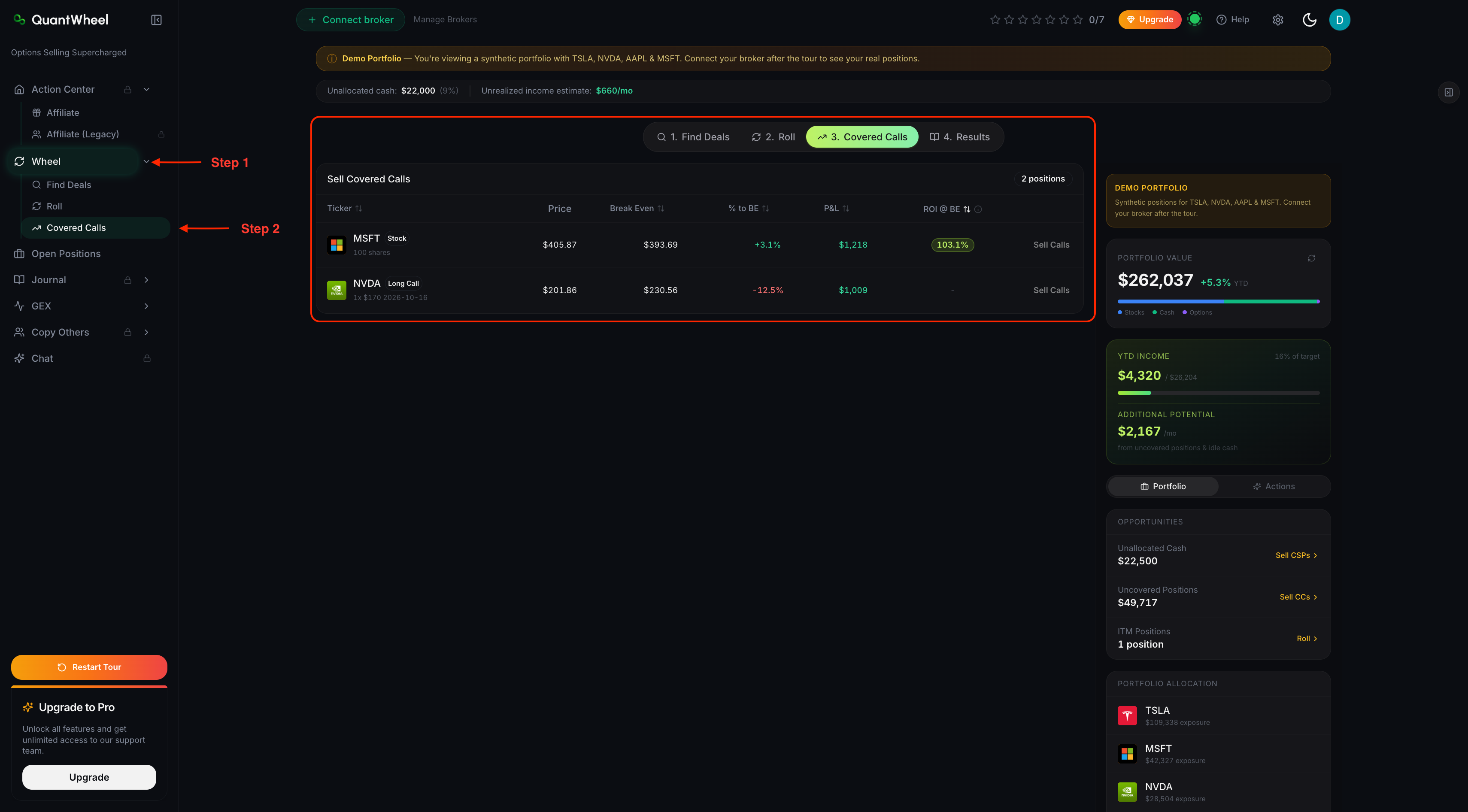
NOTE: In this tab QuantWheel only shows covered call opportunities (if there are any) for the positions you're already owning in your portfolio. If no positions show - connect your broker.
Sidenote: You can also find Covered Call opportunities the old fashioned way - in the "Find deals" tab to the left.

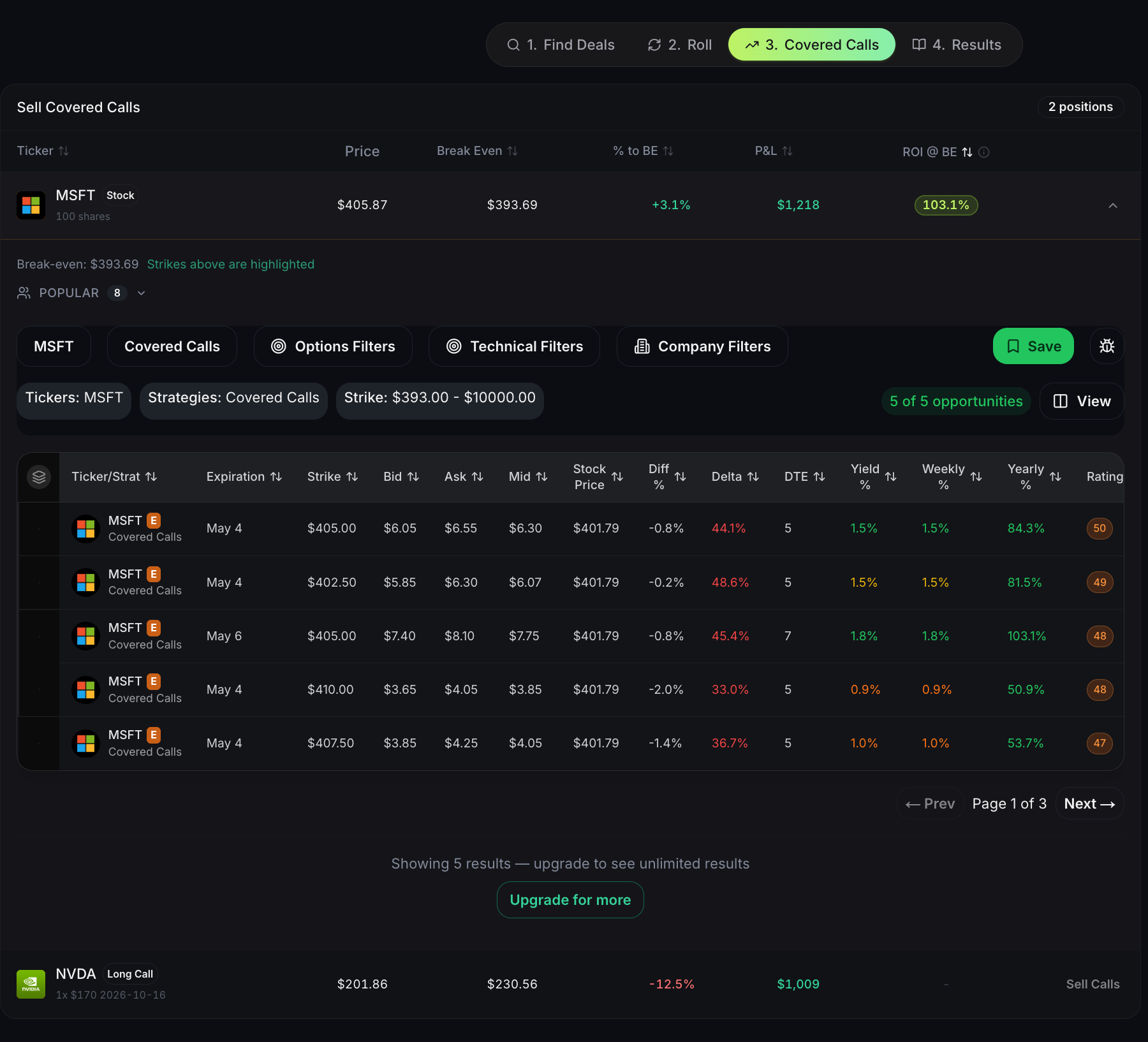
Back to it: You can expand the stock row by clicking "Sell Calls action button" which expands each row to show candidate call options you could sell.
2. Why Break Even matters more than current price
Most covered-call screeners show you call strikes above current price and tell you the yield. That's fine for long stock you bought fresh, but it misses the point for wheel positions.
When you were assigned shares from a CSP, your effective cost basis isn't just the strike you paid - it's the strike minus every premium you collected on that ticker across prior wheel stages. That adjusted cost basis is what QuantWheel calls Real Cost, and it's what Break Even uses.
Break Even is the price above which a covered call sale is guaranteed profitable - if called away at that strike, you'd break even or profit, including every premium collected before. Selling calls at or above Break Even is the safe territory. Selling below means you'd take a realized loss if called away, offset only partially by the call's premium.
3. Expanding a row - picking a strike
Click Sell Calls on any row. The row expands to show candidate call options to sell against the position. Candidates show:
- Strike - the call's strike price
- Expiration - when it expires
- Premium - what you'd collect for selling the call
- Yield % - premium divided by stock's current price (or cost basis - check the column header in your Preferences)
- Yearly % - yield annualized
- Delta - probability-like measure of whether the call ends in the money
- Rating - the composite opportunity score, same methodology as the Find Deals screener
Picking a strike is a three-way trade-off:
- Strikes below Break Even - higher premium, but if called away you realize a loss on the shares
- Strikes at or just above Break Even - moderate premium, no loss on assignment (called away at or above cost)
- Strikes well above Break Even - lower premium, but maximum upside if the stock runs
Aggressive income traders favor the first two buckets, accepting occasional losses. Conservative wheel traders stay at or above Break Even and accept lower premiums for the peace of mind.
4. Using ROI @ BE to filter the list
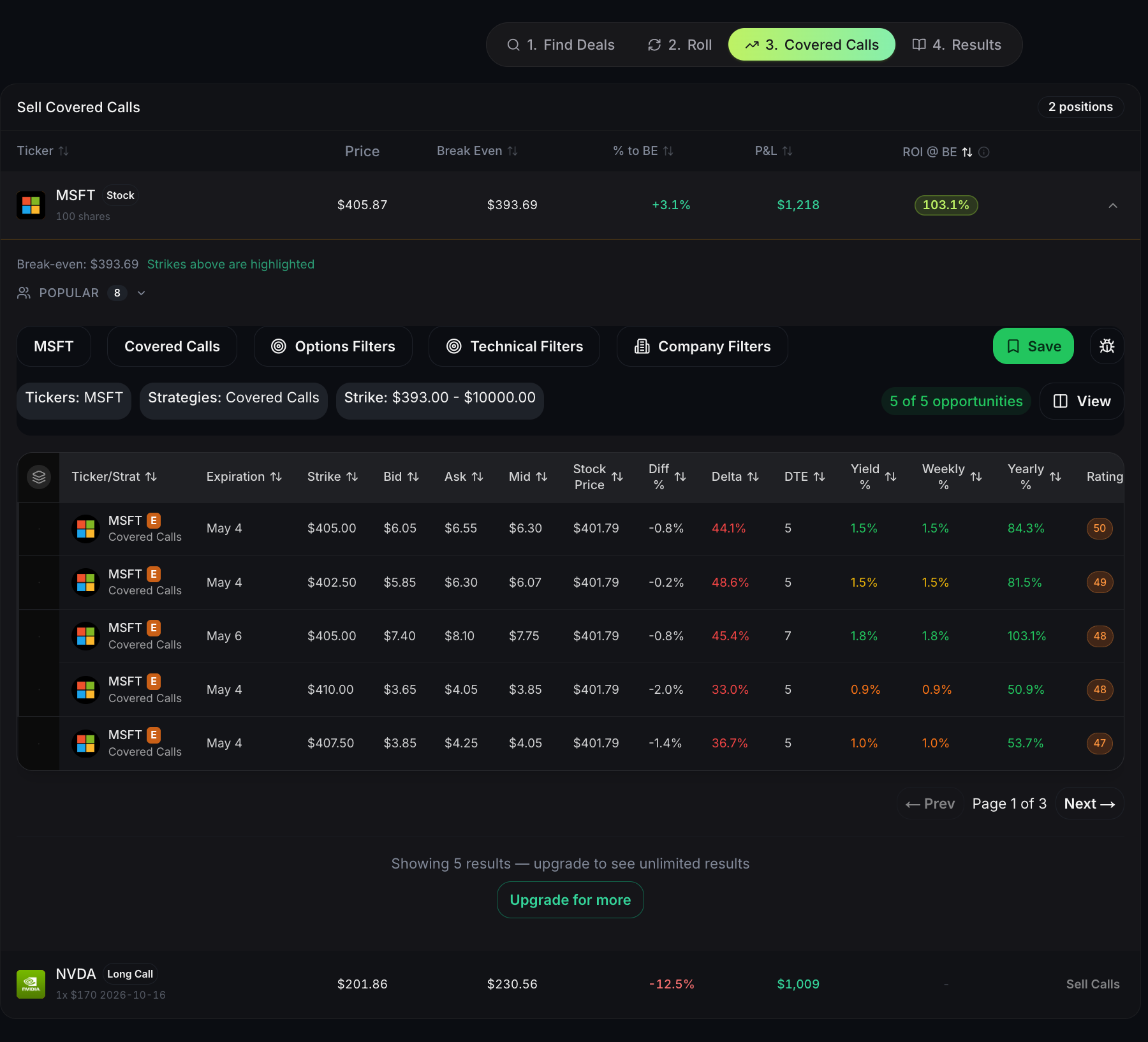
ROI @ BE in the list view is a useful shortcut for deciding which tickers are worth covering at all. If ROI @ BE is low - say, 3-4% annualized - selling calls at Break Even isn't paying much. Better to either wait for higher IV, sell below Break Even and accept the risk, or leave the position uncovered.
Tickers with ROI @ BE of 10%+ are paying enough at Break Even that covering them is attractive even from the conservative end of the trade-off.
5. Executing the covered call
QuantWheel surfaces covered-call candidates but doesn't place orders automatically. After picking a strike, execute the sale in your broker's trading interface. The auto-journal will record both the covered call and its eventual expiration, roll, or called-away event.
Common issues
The list shows 0 positions even though I have stocks.
Three possible causes:
- Stock positions below 100 shares can't be covered (one call contract = 100 shares).
- Positions already have an open covered call against them - the list only shows uncovered positions.
- The broker sync hasn't completed yet. Check Settings → Broker Integration for sync status.
My Break Even is negative or very low. What does that mean?
If you've collected a lot of premium on a ticker across prior wheel stages, your effective cost basis has been reduced below the current market price - sometimes well below. That's the wheel working: premium compounds against cost basis. A Break Even near zero means you could sell a call at virtually any strike and still be in profit on assignment.
Why does QuantWheel include Long Calls in the covered-call list?
A long call can be "covered" by selling a higher-strike call with the same expiration - this creates a vertical call spread. It's a different strategy from selling a call against stock, but the mechanic on the Covered Calls tab is similar (pick a strike, collect premium). Long calls appear here because the same screen logic applies.
Should I sell calls below Break Even for the higher premium?
That's a strategy decision, not a tool question. Selling below Break Even means you're willing to realize a loss on the shares if called away, in exchange for immediate premium. It's common practice for traders who want to exit a position anyway but want some income on the way out. It's not common practice for traders running a conservative wheel.
What happens when the covered call expires?
If the stock closes below the strike at expiration, the call expires worthless and you keep the premium and the shares. If it closes above, the call is exercised and your shares are called away at the strike price. The Results tab tracks both outcomes across all your covered-call positions.
Related
Risk disclaimer: Options trading involves substantial risk of loss and is not suitable for all investors. Past performance does not guarantee future results. This content is for educational purposes only and is not investment advice.