
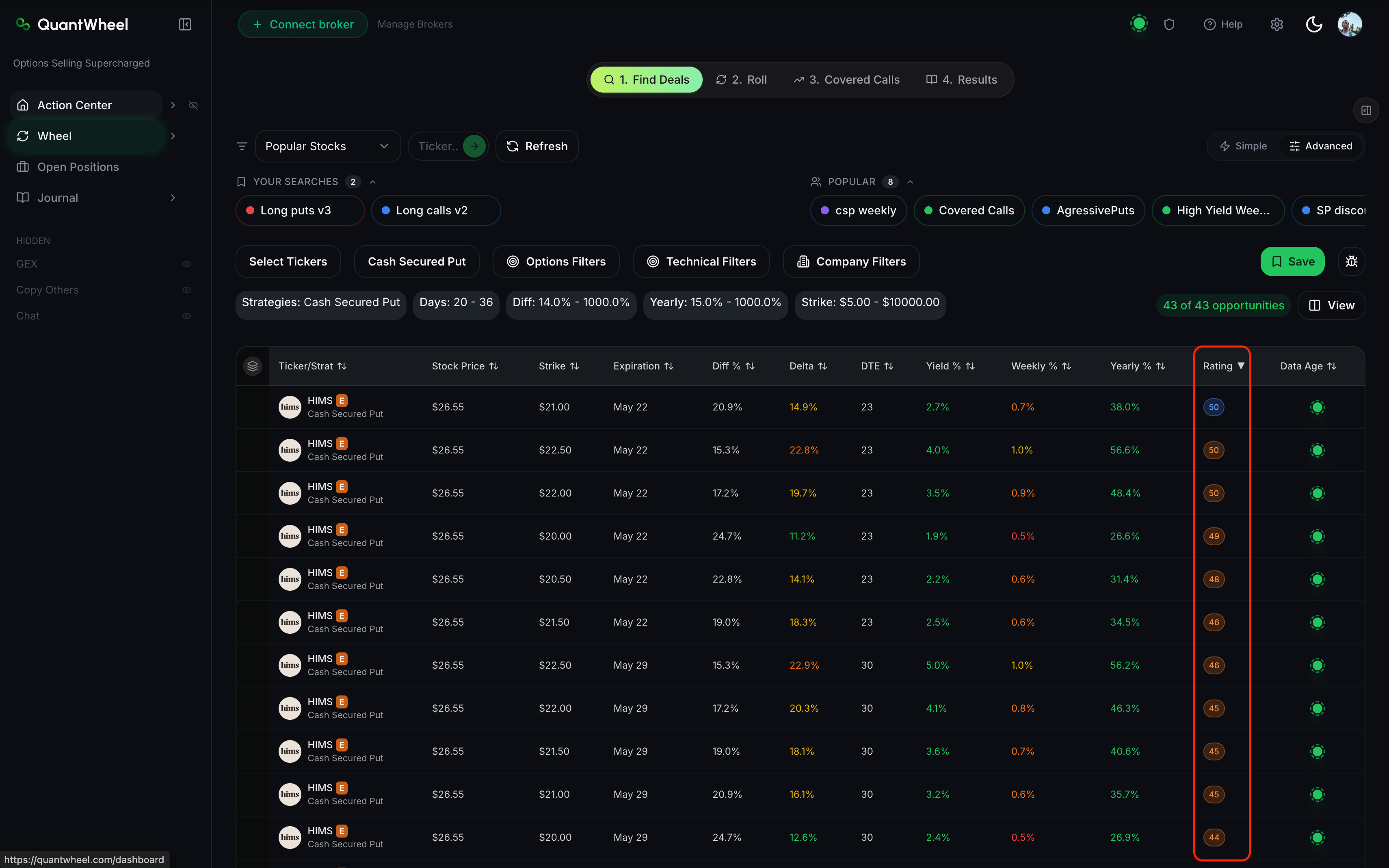
Every row in the Find Deals results table has a Rating column. The Rating is QuantWheel's proprietary score for how good an opportunity is, given your current filter set. Higher Ratings are better opportunities. The score accounts for trade-offs between premium, assignment risk, liquidity, and related market inputs. This page explains how to use the Rating in practice - when to sort by it, when to cross-check it against other columns, and when to override it.
Before you start
Required:
- QuantWheel PRO, QuantWheel GEX, or an active $1 trial.
- A ran screen in Wheel → Find Deals. See How to use the Find Deals screener if you haven't yet.
- Your Preferences configured (Target Yearly Yield, Risk Profile, Max Collateral Per Trade). Preferences seed the default filters you use before evaluating Rating.
Time to complete: 5 minutes
How to use the Rating
Sort by Rating, then scan
After applying filters, the results table shows matching opportunities. Click the Rating column header to sort from highest to lowest.
The top-ranked rows are QuantWheel's best candidates given your filters. This is the fastest way to narrow hundreds of screen results down to a handful worth evaluating.
Cross-check with Yield and Delta
Rating is a single score, but it's shaped by three inputs that matter separately:
- Yield % - how much premium the contract pays per dollar of collateral
- Delta - the option's sensitivity to price moves, which correlates with assignment probability
- Rating - the composite score
A Rating of 80 that comes with a 5% yield and a low delta is a different trade than a Rating of 80 with a 15% yield and a high delta. Same score, different risk shape.
Before picking a candidate, scan the row's Yield and Delta columns alongside the Rating:
- High Rating, moderate Yield, moderate Delta - the sweet spot the Rating is tuned to find. Lower assignment risk, decent income.
- High Rating, high Yield, high Delta - the Rating is rewarding the yield, but the delta is telling you the market prices high assignment odds. Appropriate only if your own risk tolerance is aggressive.
- High Rating, low Yield, very low Delta - deep out-of-the-money, lots of safety, but the premium may not justify the collateral tied up.
When to override the Rating
The Rating is a ranking aid, not a trade recommendation. There are situations where the top-Rated row is the wrong pick for you:
- You have a strong view on the underlying stock. The Rating doesn't know you think a stock is going to drop 10% this month. If it's about to, you don't want to sell a CSP on it regardless of Rating.
- You're at concentration limits. If you already have three CSPs on the same ticker or sector, a fourth with a high Rating still increases concentration risk the Rating doesn't measure.
- Earnings inside the window. If the contract's expiration is after an earnings announcement, the implied volatility is elevated - the Rating reflects that, but you might prefer to avoid the event risk entirely. Use the Includes Earnings filter to exclude these if that's your preference.
- Capital constraints. A Rating-85 trade that needs $50K of collateral is worse for you than a Rating-75 trade that needs $5K if you have $10K free.
Common issues
What's in the Rating formula?
The exact formula is proprietary. At a high level, the Rating balances expected premium against assignment risk and liquidity. Higher Ratings mean a more favorable balance of those factors, given your filters.
Why did the same option's Rating change between yesterday and today?
Ratings are computed against current market conditions - option prices, implied volatility, and underlying price all change intraday. A Rating of 78 in the morning might be 71 in the afternoon because the premium decayed or the underlying moved. Re-running the screen always reflects current data.
Why do two different accounts see different opportunities at the top of the table?
Preferences and the current screen filters change which contracts remain visible after filtering. Two users with different target yields, assignment-risk defaults, or collateral limits can end up comparing different shortlists, even when the raw market data is the same.
I changed my filters and the Rating numbers shifted. Why?
Rating is relative to the current filter set, not absolute. When you tighten filters, the universe shrinks, and the Rating rebalances within the smaller universe. This is why a Rating of 75 with wide-open filters isn't comparable to a Rating of 75 on a narrow, high-quality filter set.
Is a Rating of 100 ever shown?
Ratings in the 90s appear when a contract fits the filter criteria unusually well. A 100 would require a theoretically-perfect match across every input, which is rare in a live market. Treat 85+ as "strong candidate" rather than looking for 100.
Related
Risk disclaimer: Options trading involves substantial risk of loss and is not suitable for all investors. Past performance does not guarantee future results. This content is for educational purposes only and is not investment advice.