
Featured traders are QuantWheel users who've opted to share their trading activity publicly. Following one lets you see their signals in near real-time, along with context on their strategy and historical performance. This page walks through browsing the Featured Traders grid, reading a trader's profile, subscribing, and using signals responsibly.
Before you start
Required:
- QuantWheel PRO.
- Familiarity with the educational-only framing. Read How copy trading works on QuantWheel first if you haven't.
Time to complete: 6 minutes
Steps
1. Open Copy Others
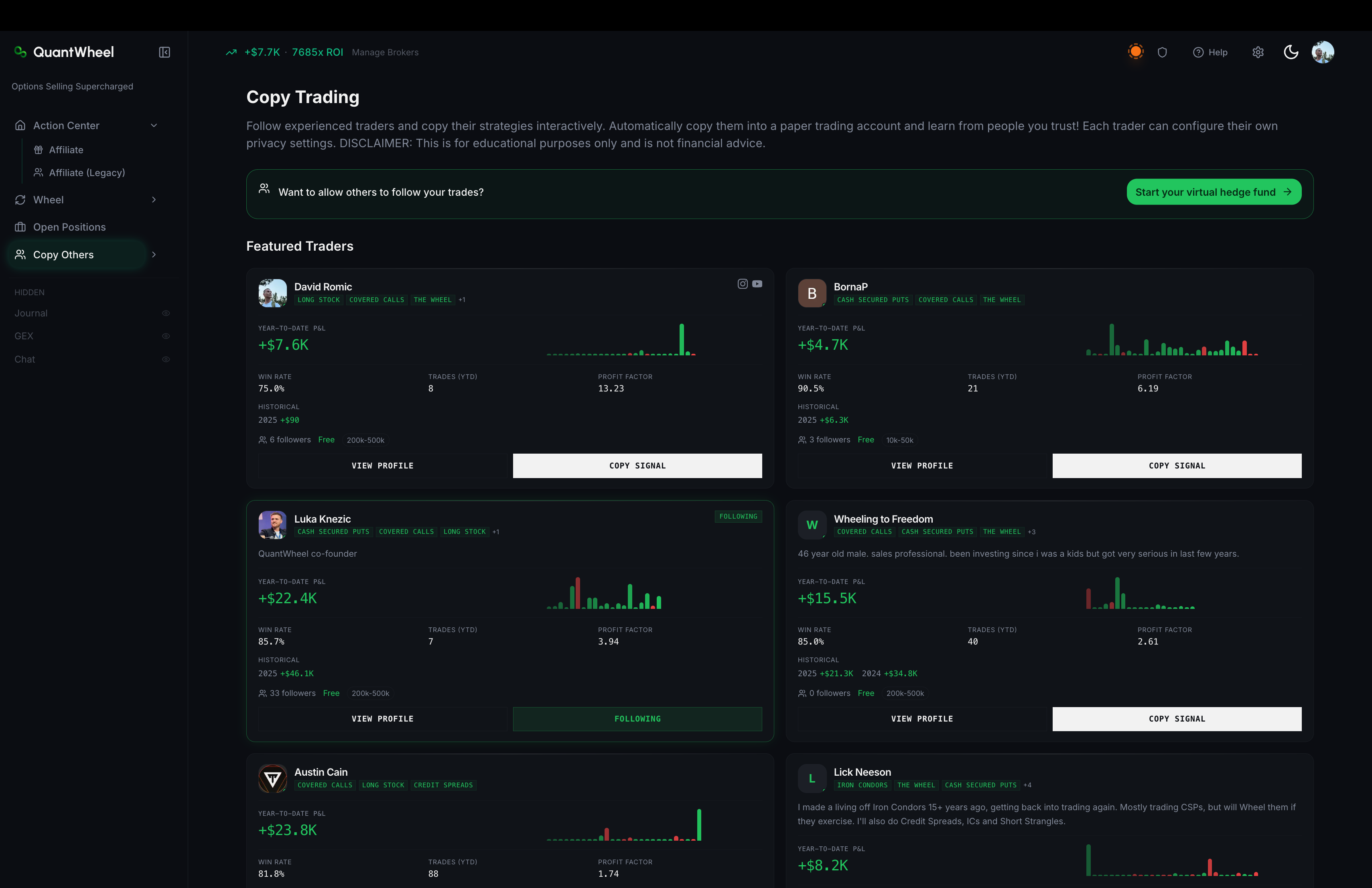
In the sidebar to your left hand side, click Copy Others. The default view is the Featured Traders grid.
2. Browse the grid
Each featured trader card shows:
- Display name and avatar
- Strategy focus selected by the trader
- Performance metrics when enough synced trading history is available, such as YTD P&L, win rate, total trades, and profit factor
- Subscriber count - how many other QuantWheel users currently follow
- Subscription pricing - free, paid monthly, or in a paid tier
QuantWheel sorts active traders ahead of inactive profiles so cards with recent performance data are easier to compare.
3. Open a trader's profile
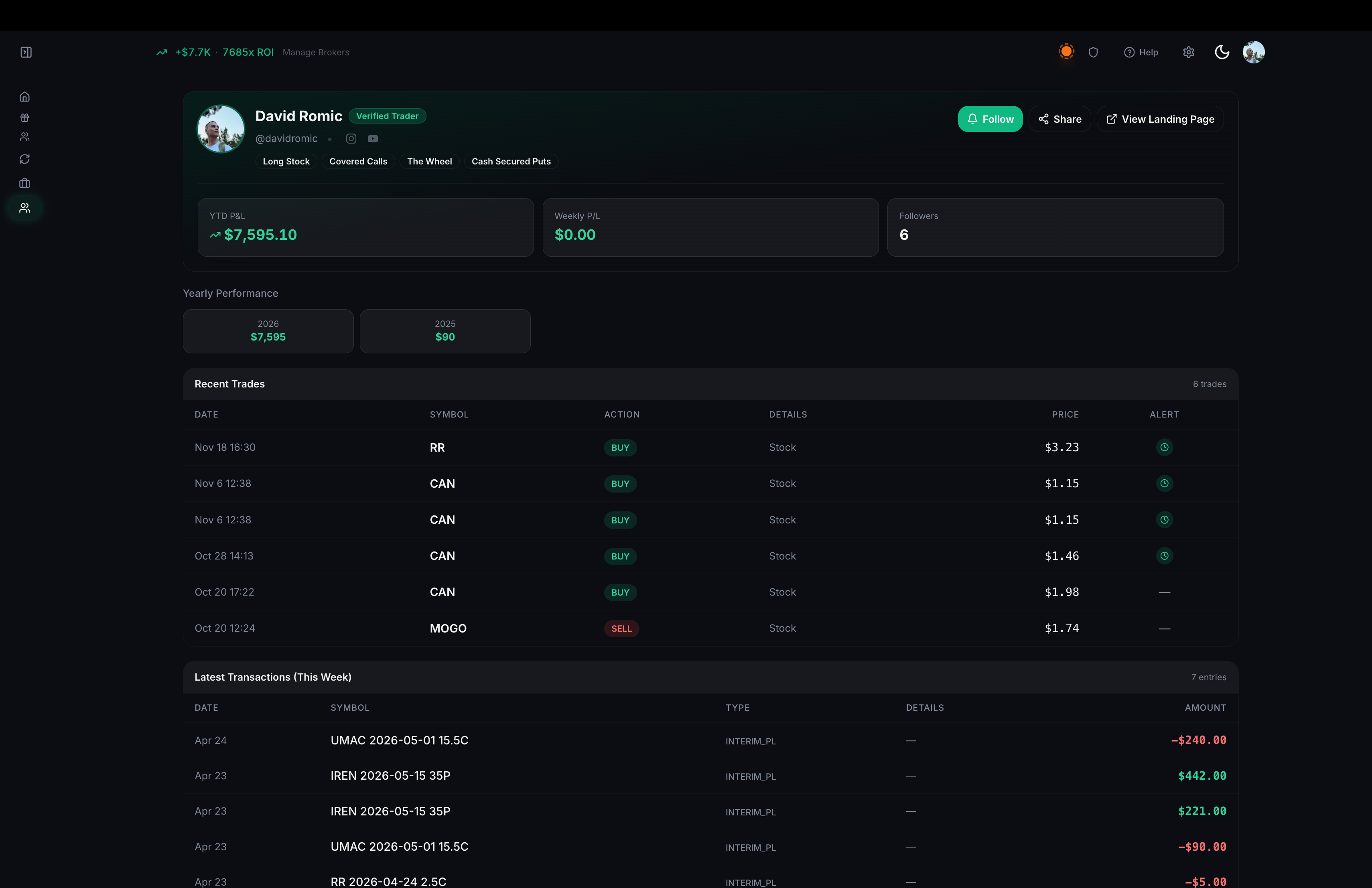
Click View Profile on any card. The profile page shows the full picture:
- Bio - a short self-description the trader has written
- Strategy tags - what they focus on
- Performance stats - when enough synced history is available
- Social links or profile details - if the trader has added them
- Required disclosures - explicit past-performance-doesn't-guarantee language
Read the bio and strategy first. If their approach doesn't match what you're trying to learn, the performance numbers don't matter.
4. Evaluate responsibly
Before subscribing, ask:
- Is their strategy what I want to learn about? A wheel trader's signals are useful for wheel learners, not for swing traders.
- Is their account size similar to mine? A trader with $500K can take very different positions than one with $50K. Smaller-account traders' signals translate more directly.
- Do their returns come with drawdowns I could tolerate? A 40% annual return with a 30% drawdown is a very different experience than 20% return with 5% drawdown.
- Is this a free subscription, or worth paying for? Paid subscriptions should come with added value - commentary, rationale, explanations - not just raw signals.
5. Subscribe
Click Subscribe (or "Copy Signal" if that's the button label). Depending on the trader's terms:
- Free traders: one click, no payment info. Subscription takes effect immediately.
- Paid traders: you're taken through a payment flow. The required "educational use only" acknowledgment appears before confirmation. Subscriptions are typically monthly with cancel-anytime terms.
After subscribing, the trader appears as followed on the Copy Trading page and their signal delivery follows the notification preferences you selected in the subscription dialog.
6. Read signals as they arrive
New signals from followed traders appear in the Copy Trading feed. Each signal shows:
- Timestamp - when the trader made the move
- Ticker and strategy - what they did (e.g., "Sold CSP on NVDA $120 strike, exp Nov 15")
- Position sizing - as a percentage of their portfolio (not dollar amount)
- Rationale (on paid subscriptions, typically) - why they made the trade
Whenever you read a signal, remember: the decision to act on it is yours. Evaluate against your own account and strategy. Place the trade in your broker if you decide to act.
How to get value from following
Start with 1-2 traders, not 10
Following 10 traders produces too much noise to learn from. Start with one or two whose strategies you want to understand deeply. Watch their feed for a few weeks. Add more only when you have bandwidth to absorb additional signals.
Use their signals to back-test your evaluation
For each signal you see, ask "would I have taken this trade?" before reading the rationale. Then compare. Over time, you'll see where your evaluation aligns with experienced traders and where it diverges. The divergences are the learning opportunities.
Don't chase performance
The temptation is to subscribe to whoever has the hottest recent numbers. That's usually a mistake - recent performance often reverts. Subscribe to traders whose process you admire, even if their recent numbers are mediocre.
Unsubscribe without guilt
If a trader's signals aren't teaching you anything, or their style doesn't fit your learning goals, unsubscribe. It's not personal - it's just recognizing misalignment.
Common issues
The Featured Traders grid looks empty.
Either your plan tier doesn't have Copy Trading (check you're on PRO, not GEX), or there's a loading delay. Refresh the page.
I subscribed but I'm not seeing signals.
Three possibilities: (1) the trader hasn't made any trades since you subscribed; (2) your subscription dialog has email or Discord delivery turned off; (3) the trader's broker sync is lagging. Check back over 48 hours before treating it as a bug.
A paid subscription renewed and I forgot to cancel.
Monthly subscriptions auto-renew. You can cancel from the trader's subscription dialog - see How to manage your copy trading subscriptions. Refund terms for mid-period cancellations are in the subscription's confirmation at signup.
I want to report a featured trader whose content seems misleading.
Use the Help link in the top bar. Include the trader's display name and the specific concern (false performance claims, misleading rationale, etc.).
Related
Risk disclaimer: Options trading involves substantial risk of loss and is not suitable for all investors. Past performance does not guarantee future results. This content is for educational purposes only and is not investment advice.